
Making the Most of Microsoft Copilot: Easy Tips & Key Differences
Microsoft Copilot is more than just your smart assistant — it’s a productivity powerhouse to help ease the tasks you have at hand. Whether you’re drafting emails, summarizing documents, or curating creative ideas, Copilot helps you work both faster and smarter at the same time.
Top 10 Ways to Use Copilot Effectively
Here are some everyday tasks Copilot can help with – and here’s how to get the most out of it:
- Ask Smart Questions
Be specific. Instead of prompting Copilot to “Tell me about marketing”, try prompting Copilot to “Compare digital marketing vs. traditional marketing in a table form with descriptive examples”. - Draft Emails Quickly
Mention the specific tone and length your email draft requires. Try prompting “Make it short and casual” or “Use a professional tone” and watch Copilot do its magic. - Summarize Documents
Upload your file to Copilot chat and promote Copilot to generate bullet points based on your uploaded file. Works great for long reports and PDFs. - Generate Creative Ideas
Let Copilot assist you with brainstorming agendas, taglines, or social media posts! - Start Documents from Scratch
Ask Copilot for outlines or full drafts when you require to write something up from scratch - Improve Your Writing
Let Copilot assist you in providing multiple versions of a sentence to find the best fit for what you are looking for. - Learn New Topics Fast
Use plain language requests when prompting Copilot like “Explain AI in simple terms” - Create Custom Images
Describe to Copilot the style and subject clearly, e.g., “Romantic pop art of office coffee crisis” - Translate Messages
Just prompt Copilot to “Translate to [language]” and paste your text that needs to be translated. - Add Fun to Work
Ask Copilot for jokes, memes, or light-hearted messages to brighten you and your colleague’s day.
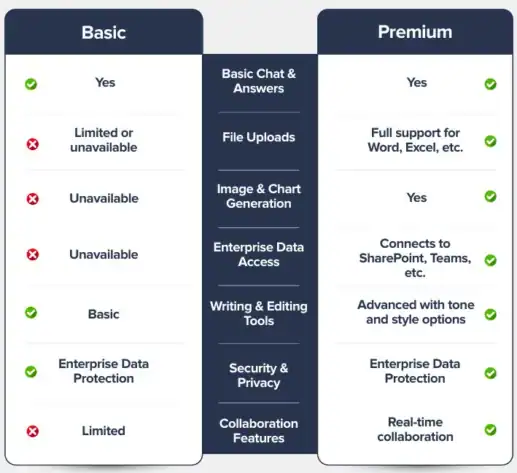
Basic vs. Premium features of Copilot – What’s the Difference?
Ready to unlock the power of AI with Copilot?
Let’s take the next step together — reach out to us at sales@enfrasys.com today!